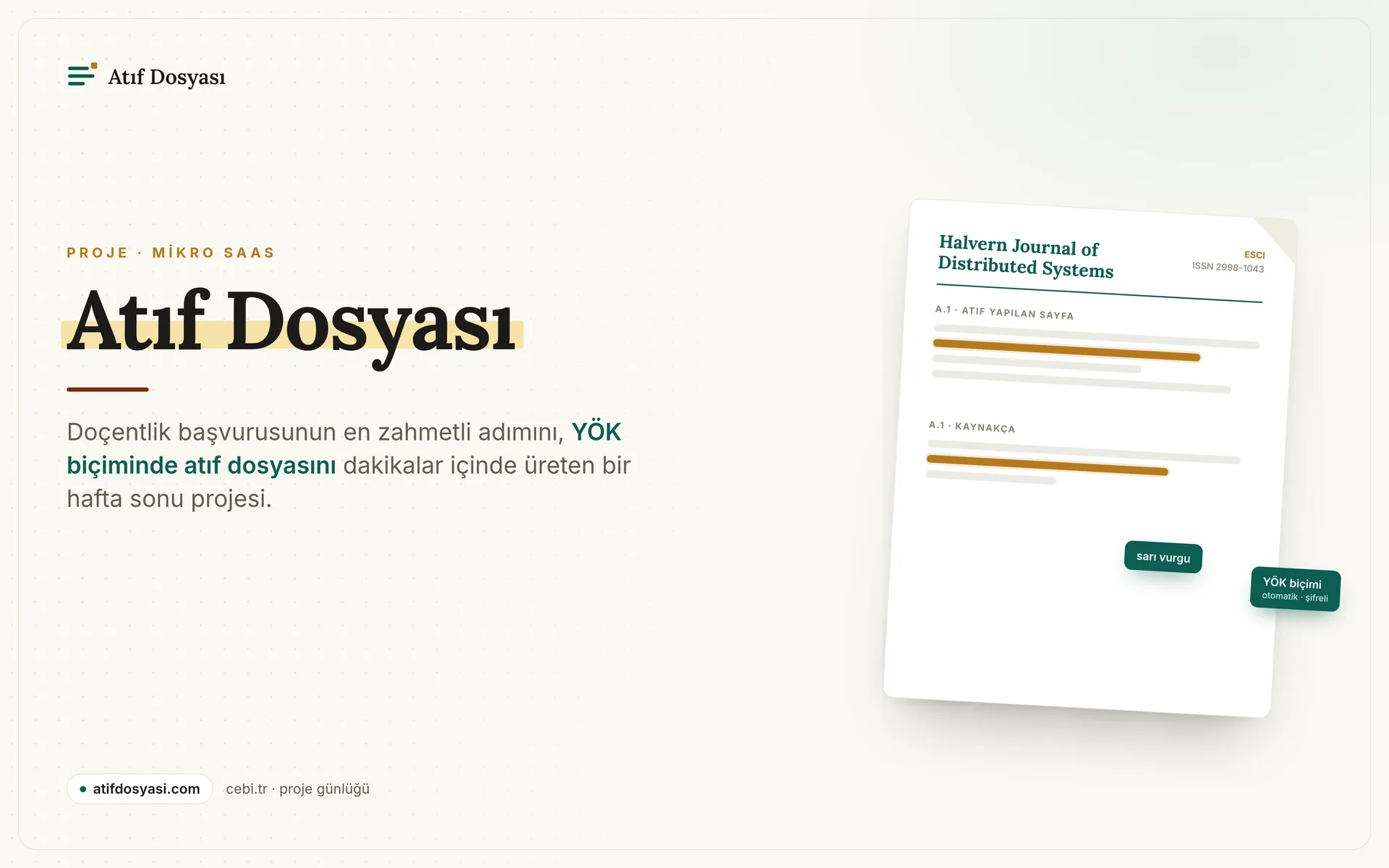
Atıf Dosyası: Automating the Most Tedious Step of Your Associate Professorship Application
A free, encrypted micro-SaaS that generates YÖK-compliant citation files for associate professorship applications in minutes.

Last year, I shared the publication journey of two of my papers on this blog. During that process, I inadvertently found myself in the kitchen of academic publishing; I got a close-up look at every stage, from data collection to journal selection, and from reviewer responses to citation tracking. As I talked to academics in my inner circle, I kept hearing the same complaint over and over: the associate professorship application is exhausting on its own, but there is one step in it that intimidates everyone. The citation file.
In this post, I will explain both what this file is and introduce Atıf Dosyası, the platform I developed to cut down the preparation time from hours to minutes. I had two goals: to leave our professors with a tool that is actually useful and to see what it's like to build an end-to-end micro SaaS all by myself. Both happened, and I wrote about both right here.
Associate professorship, citations, and the file chasing points
One of the major hurdles an academic in Turkey faces while climbing the career ladder is becoming an associate professor (doçentlik). The application is made through the Associate Professorship Information System (DBS) in accordance with the requirements set by the Interuniversity Board (ÜAK). Candidates enter their publications into the system; a total score is calculated based on specific rules for each publication and the citations received. Once the jury completes their evaluation, those who pass the threshold earn the title of associate professor. The legal framework for this process is outlined in the Associate Professorship Regulation.
Entering publication details is relatively easy. The DBS can largely pull the author list, volume and issue information, page range, and abstract automatically using the article's DOI number. The real work—and the most exhausting part—is the citations. Each citation received by an article you've written is evaluated differently based on the index of the citing publication. This is where the Web of Science Core Collection indexes come into play: SCIE, SSCI, AHCI, and ESCI. There is also the national TR Index managed by TÜBİTAK ULAKBİM. You can verify which index your journal is covered in via Clarivate's Master Journal List.
In short, even a single citation is essentially a mini research project: Who made the citation, in which journal, which index is that journal in, and where does the citation appear in the text? All of this needs to be documented.
The rules have changed, and the grunt work has grown
Documenting citations used to be a simpler task. Writing down the citation count, which index it came from, and the citation details in a format like APA in a Word document was usually enough. It took time, but at least it was a mechanical job.
With the regulatory change published in the Official Gazette on October 14, 2025, the quality, originality, and contribution of works to the field have come to the forefront in evaluations. The documentation of citations has also tightened. Under the new system, you are now expected to prepare the following for each individual citation:
- The cover or title page of the publication making the citation
- The first page of the publication
- The page where the citation appears
- The line in the bibliography pointing to your work
Moreover, these need to be marked on paper, and the citation must be clearly visible. The document we call a "citation file" is exactly this: a single PDF where these four parts are collected in the correct order, with the relevant lines highlighted.
Now, think about this at scale. Let's say you have forty citations. For each one, you have to open multiple PDFs, find the right pages, take screenshots, highlight the relevant sentence in yellow, and then combine them all in order into a single document. This is a chore that consumes an academic's most precious resource—their time—in the most inefficient way possible. The worst part is that there is absolutely no creative or intellectual side to it; it is purely mechanical from start to finish.
What does Atıf Dosyası do?
Atıf Dosyası targets exactly this mechanical burden. The logic in a single sentence is this: you introduce your source article, provide the citations and PDFs of the works that cite it, and the system generates a single PDF for each citation in the format required by YÖK, with the correct pages selected and the citation line highlighted in yellow.
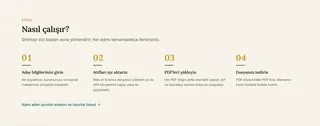
The workflow is split into a four-step wizard:
- Candidate and source article. You enter the citation details of your own article: title, first author's surname, year, and DOI.
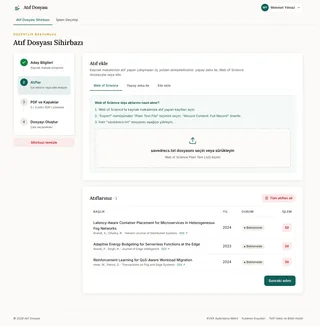
- Importing citations. You can add the citing works in three ways: by uploading an export file from Web of Science, by pasting a citation and having the AI parse it, or manually.
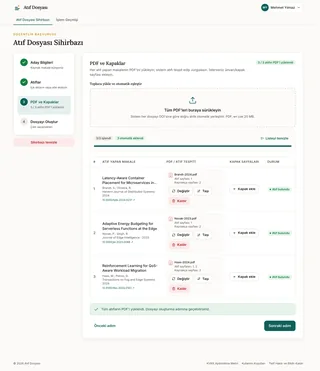
- PDFs and covers. You upload the PDFs of the citing articles; the system matches each PDF to the correct citation and finds the reference within the text and the bibliography itself.
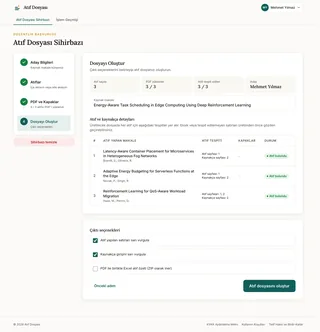
- Generating the file. In the final step, you see a summary of everything, generate the file, and download it.
In short, the homepage and this four-step flow look like this:
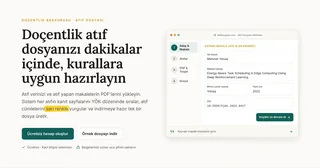


The platform is currently free, doesn't ask for card details, and stores the documents you upload encrypted on the server. I'll get to the engineering behind these decisions in a moment; first, let me show you what it does with an example.
Using an example: Mehmet Yılmaz's citation file
It's better to show than to tell. I've created a sample candidate account in the system. His name is Mehmet Yılmaz, he works in a computer engineering department, and his source article is "Energy-Aware Task Scheduling in Edge Computing Using Deep Reinforcement Learning".
All the articles, journals, and citations here are not real; to avoid copyright issues, they are sample data that look formally similar to the real ones but are entirely fictional. My goal is to demonstrate the tool's workflow in a realistic scenario.
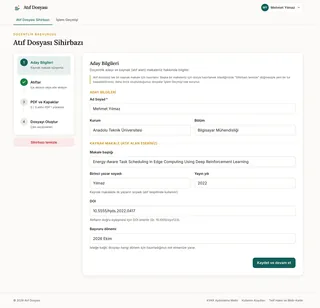
In the first step, the candidate and source article information is entered.
In the second step, citations are imported. In this example, three studies cite Mehmet's article; all three are added to the list.
The third step is the crucial part. The PDFs of the citing articles are uploaded, and the system matches each one to the correct citation via the DOI in its metadata. Then, it searches for the citation to Mehmet's article within each PDF: both in the text and in the bibliography. When it finds it, it marks the location of the line and says "Citation found".
In the final step, a summary of everything is generated: how many citations there are, how many have had their PDFs uploaded, and how many have had citations detected. From here, you select the output options and generate the file.
The four steps of the wizard, in order:




Here is the generated file
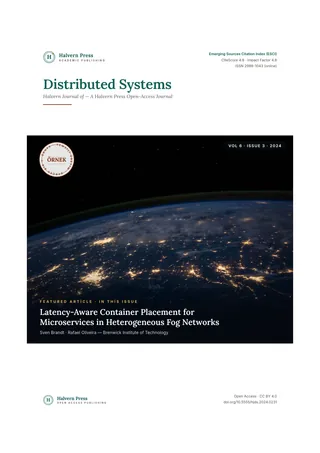
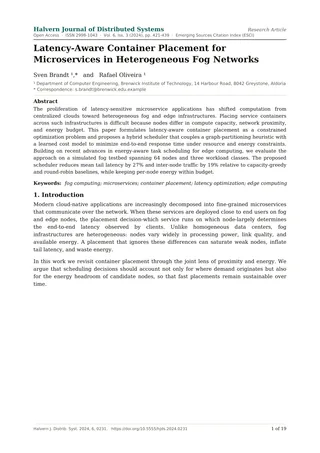
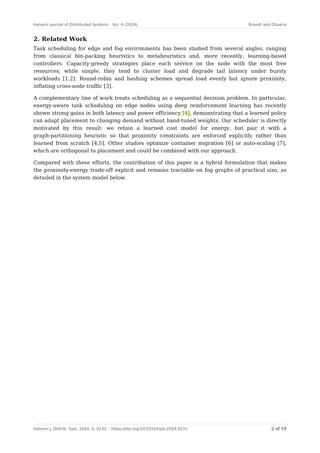
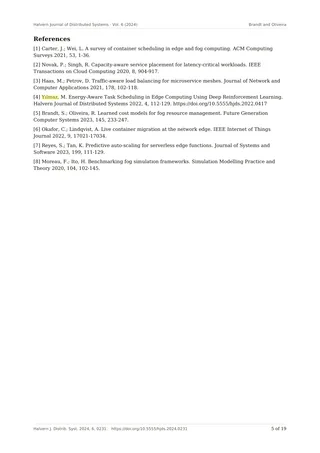
As soon as you click "Generate citation file," all those pieces merge into a single PDF. A separate section is created for each citation, containing four evidence pages in order: the publication's title (cover) page, the work's title page, the page where the citation appears, and the bibliography page. The line where the citation appears and the corresponding reference in the bibliography are highlighted in yellow; that is exactly what the jury needs to see at a glance.
Here are the four evidence pages of one citation from the sample file, in order:




Every file you generate is saved in your account's operation history, so you can download it again whenever you want.

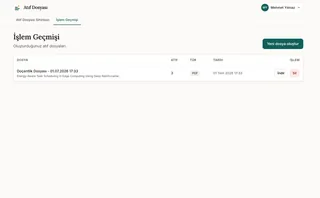
In Mehmet's three-citation example, this turned into a document over thirty pages long, generated in just a few seconds. If you had done this manually, it would have taken you half an hour just for three citations; for forty citations, you'd have to kiss a whole day goodbye.
Under the hood: The engineering side
As a computer engineer, this was the most fun part of the project, so I'm going to dive into some technical details.

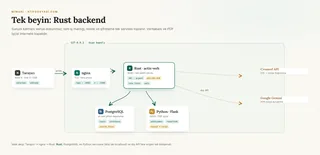
I relied on a single principle for the architecture: the presentation layer does not touch the data. The interface the user sees is a Vue application written with Nuxt 4, but only the backend, written in Rust, accesses the database, files, and external services. This way, authentication, authorization, encryption, and business rules are all centralized; no matter how much the interface changes, the security boundary always stays in the same place.
The backend is a Rust service running on actix-web. It manages sessions with JWT, stores passwords with argon2, and applies rate limiting to requests. On the database side, I used sqlx; queries are validated against the actual schema at compile time, meaning a wrong column name blows up in the compiler before the code even runs. For a solo project, this is invaluable for catching midnight mistakes early.
How does citation detection work?
The most enjoyable part is the citation detection. When a PDF is uploaded, a separate Python service that handles PDF tasks kicks in. First, it extracts the text of the pages and the coordinates of every word on the page using pdfplumber. Then it follows these steps:
- It finds the bibliography page. It understands this either from headings like "References" or "Kaynakça," or from numbered reference patterns.
- It searches for your paper in that list: first it tries your DOI, and if it can't find it, it tries title similarity and your first author's surname.
- It captures the reference number of the matching line. For example, "[4]".
- It finds the page in the body of the text where that same "[4]" mark appears.
- It returns the coordinates for both the citation mark in the text and the line in the bibliography.
Once we have these coordinates, a semi-transparent yellow layer is drawn over the output PDF using reportlab; this highlights the two lines the jury needs to see. So, the "yellow highlight" isn't actually an image processing trick, but a precise box calculated from the text's position.
Security and encryption
An academic document is the product of personal effort; I didn't want them sitting plain on the server. Every PDF uploaded and every file generated is kept encrypted on disk with AES-256-GCM. Moreover, I used an envelope encryption approach: each file has its own key, and that key is encrypted and stored with a master key. This way, when a file needs to be deleted or shared, the operation only concerns that file's key, not the entire system.
There is also an invisible but important decision: the database and the Python service only listen to the machine itself (127.0.0.1) and are completely closed to the outside. The only door talking to the internet is nginx, which terminates TLS and forwards requests to the backend. In other words, the attack surface was kept intentionally small.
Simplifying citations
For those who don't want to enter citations manually, there are two shortcuts. You can upload the export file you get from Web of Science as is; the system parses this file and dumps the citations into a table. Or, you can paste a citation as free text; in this case, the DOI and citation are verified via Crossref's open API, and Google Gemini parses the messy text into fields like title, author, and year. Neither is mandatory, but they save a lot of time with long lists.
Design, small decisions, and what's next
For the visual language, I went with something simple and academic: an ivory background, a serif font for headings, teal for emphasis, and citation yellow. I didn't include a dark mode; that was a conscious decision, as I figured an academic in the middle of a frantic application process would want a tool that works quickly during the day. Every bit of text in the interface was written with a multi-language infrastructure in mind from the start, because I might want to add an English version down the line.
The whole system lives on a single server: nginx, a Rust backend, a Python service, and PostgreSQL are all on the same machine, managed by systemd. For a one-person project, this keeps management simple and costs almost zero. That's the "micro" side of Micro SaaS: as long as you can keep it small, you can keep it running all by yourself.
There are a few things I want to add in the coming period; specifically, a layer that estimates citation scores based on the index and a pre-submission check. But the main job—turning grunt work into a matter of minutes—is already working.
Closing and resources
Atıf Dosyası is now live and free for everyone. I wanted to make things a little easier for our professors on their path to associate professorship; for me, it was a fun experiment in designing and launching an end-to-end product all by myself.
For those curious about the official side of the application, here are some reliable sources:
- ÜAK Associate Professorship Application Requirements
- Associate Professorship Information System (DBS)
- Associate Professorship Regulation (Official Gazette, 2018) and the amendment dated October 14, 2025
- TR Dizin and Web of Science Master Journal List
I’d be thrilled if you tried out the tool, gave some feedback, or reached out if you find a bug. Most of all, I’d love to hear that someone saved an evening of stress during their application process.